TradingView alerts
Send one TradingView alert to several places at once
A TradingView alert has room for one webhook URL. If the same alert should reach your Telegram, your Discord and a trading bot, you would normally have to make it three times. Put one URL in the alert and split it here.
How it works
You put one webhook.stream URL into your TradingView alerts. Each place the alert should go is an automation on that URL. When an alert arrives, every automation that matches it runs at the same moment, and each one is logged separately.
Step 1: get your webhook URL
This is the address TradingView will send your alerts to. You stay on this page, so the steps stay in front of you.
Free. No signup. You stay on this page.
The inspector opens in a new tab. A free URL works for 7 days.
Step 2: point a TradingView alert at it
- On your chart, create an alert (the alarm clock button) or edit one you already have.
- Open Notifications, tick Webhook URL and paste your webhook URL.
- In the Message box, write what the alert should say. Use the message your trading bot needs if you have one, or plain words if it is only going to chats.
- Save the alert.
Fire it once now so you have a real alert to work with. The quick way is a price alert whose condition is already true, such as the price being greater than a value well below today's, set to trigger only once.
Step 3: add each destination
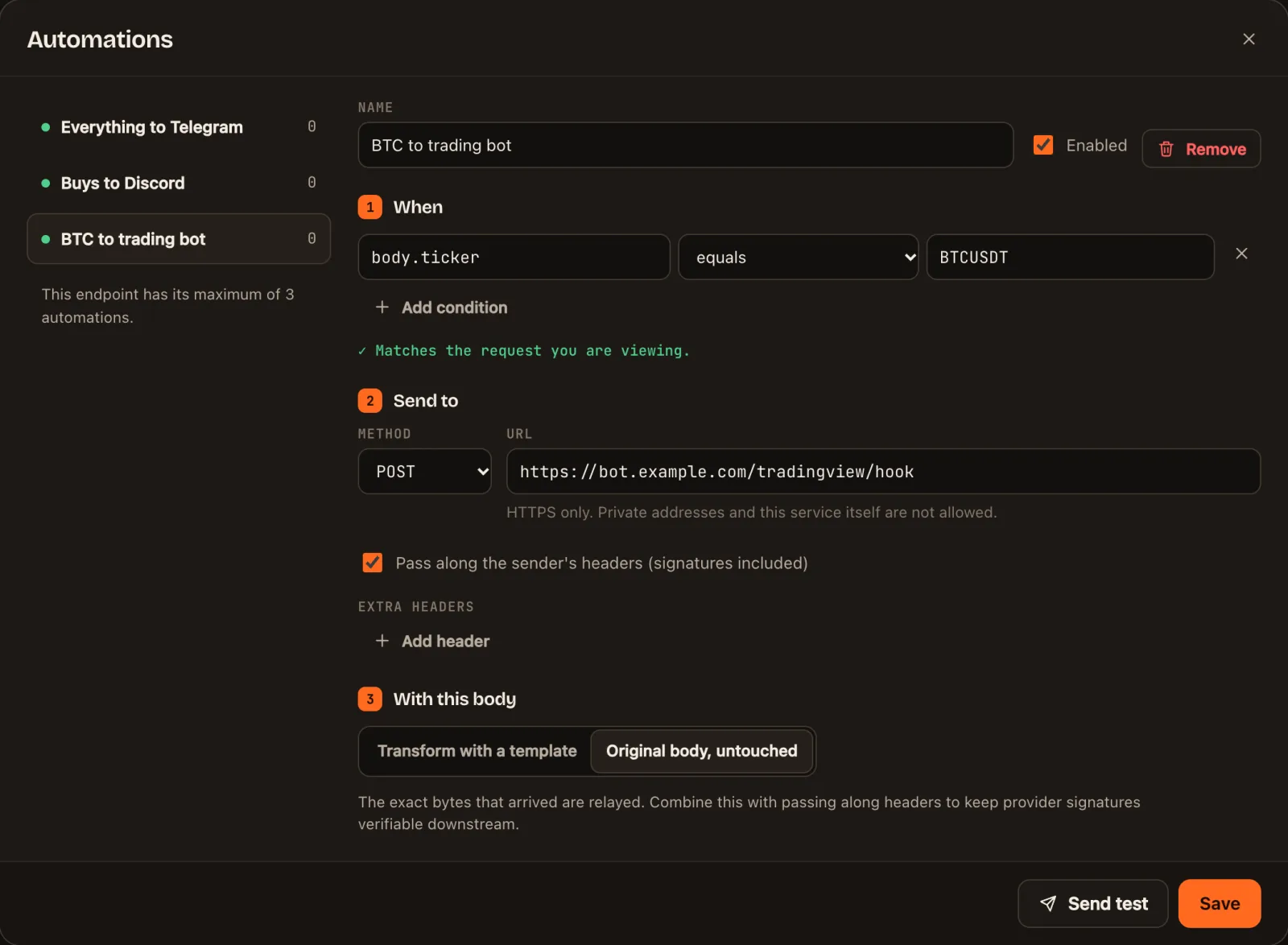
Open the inspector from the box in step 1, select the alert you fired and click Automations. Add one automation for each place:
| Send it to | Start from | How |
|---|---|---|
| A Telegram chat, group or channel | Notify Telegram | TradingView alerts to Telegram |
| A Discord channel | Notify Discord | TradingView alerts to Discord |
| A trading bot or another service that accepts TradingView webhooks | Forward to my API | Paste the address the service gave you. It receives the alert unchanged |
| A Slack channel | Notify Slack | Webhook to Slack or Discord |
| A push notification on your phone | Push with ntfy | Install the ntfy app, subscribe to a topic with a long random name and use its address |
| A spreadsheet-style log | Custom request | Webhook to Airtable |
Click Send test on each one to try it with the alert you fired, then Save.
Give each destination its own filter
Under 1 When, each automation can have conditions of its own. With alerts written as labelled values (see alert message templates), some examples:
| Destination | Field | Operator | Value |
|---|---|---|---|
| Telegram: everything | No conditions | ||
| Discord: buys only | body.signal | equals | buy |
| Trading bot: one market only | body.ticker | equals | BTCUSDT |
If the alert is plain text and one destination needs something else
Chats are happy with the alert's own words: use {{raw}} in their templates and the message arrives as written. A trading bot usually needs the exact message it documents, so write the TradingView message for the bot, forward it unchanged with Forward to my API, and let the chat automations pick readable parts out of it.
Before you connect a trading bot
- A failed delivery is not tried again. It is recorded on the alert's Deliveries tab with the reason. Decide whether a missed order is something you can live with.
- Some services only accept TradingView's own addresses. Forwarded alerts come from webhook.stream's servers. If a service checks where a request came from, it will refuse them.
- After 15 failures in a row, an automation pauses itself so it stops sending to something that is not working. Its page tells you, and you switch it back on once the destination is fixed.
- Check the log. Each alert's Deliveries tab shows what every destination was sent and what it answered, which settles most "did it fire?" questions.
Limits
| Free URL | With a Pro pass | |
|---|---|---|
| Destinations per URL | 3 | 10 |
| Messages sent per day | 1,000 | 10,000 |
| Messages sent per minute | 30 | 120 |
| Alerts kept to look back on | 250 | 2,000 |
| How long the URL works | Up to 7 days | 30 days or 1 year, and you can add more |
An alert sent to three places counts as three messages.
Questions
A free URL can send each alert to 3 places. A URL with a Pro pass can send to 10.
No. Each destination has its own conditions, so one chat can get every alert while another gets only buy signals or only one market.
It receives exactly what TradingView sent, byte for byte. Two things can differ: the request comes from webhook.stream's servers, not TradingView's, so a bot that only accepts TradingView's own addresses will refuse it, and a delivery that fails is not tried again.
Yes. Each delivery is made separately, and one that is slow or failing does not hold up the rest.
webhook.stream is an independent service. It is not affiliated with or endorsed by TradingView, Telegram or Discord. Nothing on this page is financial advice.